Saturday, April 28, 2012

The Witness

The Witness

The Witness
Brand : | Rate : | Price : $65.68
Post Date : Apr 28, 2012 09:21:14 | Usually ships in 24 hours

The Witness

Daughter of a cold, controlling mother and an anonymous donor, studious, obedient Elizabeth finally let loose one night, drinking too much at a nightclub and allowing a strange man’s seductive Russian accent to lure her to a house on Lake Shore Drive. The events that followed changed her life forever. Twelve years later, the woman now known as Abigail Lowery lives alone on the outskirts of a small town in the Ozarks. A freelance programmer, she works at home designing sophisticated security systems. Her own security is supplemented by a fierce dog and an assortment of firearms. She keeps to herself, saying little, revealing nothing. Unfortunately, that seems to be the quickest way to get attention in a tiny southern town. The mystery of Abigail Lowery intrigues local police chief Brooks Gleason, on both a personal and a professional level. Her sharp, logical mind, her secretive nature, her unromantic viewpoints leave him fascinated but frustrated. He suspects that Abigail needs protection from something, even if he doesn’t know what — and that her elaborate defenses hide a story that must be revealed. Accustomed to two-bit troublemakers, Gleason is about to walk into the sights of very powerful and dangerous men. And Abigail Lowery, who has built a life based on security and self-control, is at risk of losing both.

More Specification..!!

Disclaimer : This site/page does not included in any the parts with amazon.com but it is participant in the amazon services LLC associates program by advertising and linking to amazon.com , Certain content that appears on this site comes from amazon services LLC. This content is provided 'as is' and is subject to change or removal at any time.

Buying Garmin Forerunner 305 Price

Monday, April 16, 2012

Harry Potter and the Prisoner of Azkaban

Harry Potter and the Prisoner of Azkaban

Harry Potter and the Prisoner of Azkaban

Brand :
Rate :
Price :
Post Date : Apr 16, 2012 21:21:04
N/A

Harry Potter and the Prisoner of Azkaban

This is the braille version of the international bestseller. The Harry Potter epic continues to gather speed as Harry enters his third year at the Hogwarts School for Witchcraft and Wizardry and does battle with the traitor behind his parents' deaths. Besides coping with the usual adversaries - sneering classmate Draco Malfoy, evocatively-named Potions Master Snape - the young wizard-in-training has a new worry with the escape of Sirius Black, murderous minion of archenemy Lord Voldemort, from the magicians' prison of Azkaban. Six volumes in braille.

Disclaimer : This site/page does not included in any the parts with amazon.com but it is participant in the amazon services LLC associates program by advertising and linking to amazon.com , Certain content that appears on this site comes from amazon services LLC. This content is provided 'as is' and is subject to change or removal at any time.

Sobakawa Pillow Best Quality Nelson Sprinklers Free Shipping !8!# Keen Saratoga Shoes Discount

Monday, April 2, 2012

Harry Potter and the Prisoner of Azkaban with Bonus CD

Harry Potter and the Prisoner of Azkaban with Bonus CD

Harry Potter and the Prisoner of Azkaban with Bonus CD

Brand :
Rate :
Price :
Post Date : Apr 02, 2012 19:32:17
N/A

Harry Potter and the Prisoner of Azkaban with Bonus CD

Disclaimer : This site/page does not included in any the parts with amazon.com but it is participant in the amazon services LLC associates program by advertising and linking to amazon.com , Certain content that appears on this site comes from amazon services LLC. This content is provided 'as is' and is subject to change or removal at any time.

!8!# Purchasing Chi Flat Iron Farouk

Tuesday, March 6, 2012

North slope

!±8± North slope

Brand : | Rate : | Price :
Post Date : Mar 06, 2012 05:48:59 | N/A


North Slope is a barren desert of ice in Alaska that stretches from the Brooks Mountains to the Beaufort Sea, frozen during the winter clear to the North Pole. It is in this wilderness that the Fyffe Oil Company struggles in its search for oil. Time and money are running out; a man has been killed on the rig; suspicion and fear are rampant.

More Specification..!!

King Metal Headboards Save

Sunday, February 12, 2012

Mockingjay (The Final Book of The Hunger Games) - Audio Library Edition

!±8± Mockingjay (The Final Book of The Hunger Games) - Audio Library Edition

Brand : | Rate : | Price : $76.49
Post Date : Feb 12, 2012 10:15:11 | Usually ships in 24 hours


The greatly anticipated final book in the New York Times bestselling Hunger Games trilogy by Suzanne Collins.

FORMAT: 9 CDs, Unabridged
NARRATOR: Carolyn McCormick


The Capitol is angry. The Capitol wants revenge.

Who do they think should pay for the unrest?

Katniss Everdeen.

The final book in The Hunger Games trilogy by Suzanne Collins will have hearts racing, pages turning, and everyone talking about one of the biggest and most talked-about books and authors in recent publishing history!!!!

More Specification..!!

Discounted Forerunner Heart Rate Monitor Nike Dunk High White Dark Obsidian Discounted 300 Lb Weight Set Order Now

Sunday, February 5, 2012

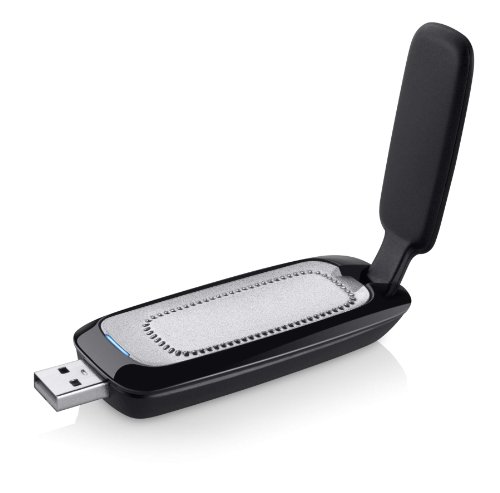
Belkin F9L1103 N750 Wireless Dual Band USB Adapter

!±8± Belkin F9L1103 N750 Wireless Dual Band USB Adapter

Brand : Belkin | Rate : | Price : $69.99
Post Date : Feb 05, 2012 04:15:00 | Usually ships in 24 hours


Quickly and securely connect a notebook or desktop computer to your wireless network.

More Specification..!!

Caramel Apples Wholesale Save You Money!

Tuesday, January 24, 2012

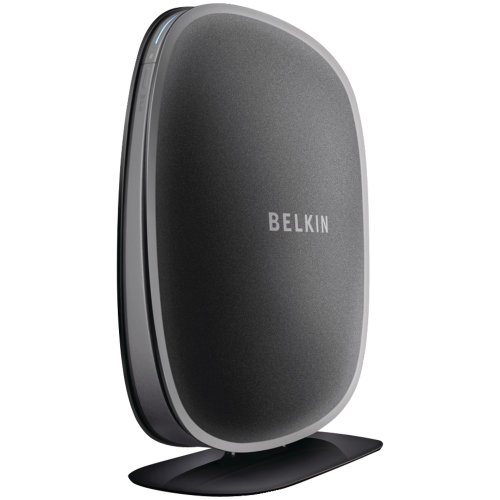
Belkin N750 Wireless Dual-Band N+ Router (Latest Generation)

!±8±Belkin N750 Wireless Dual-Band N+ Router (Latest Generation)

Brand : Belkin
Rate :
Price : $99.99
Post Date : Jan 24, 2012 20:21:15
Usually ships in 24 hours


Belkin's N750 DB Wireless Dual-Band Belkin N+ Router provides up to 900Mbps throughput Wi-Fi + routing speeds combined.† The Belkin N750 DB gives you superior performance for home-theater video streaming and gaming. Featuring exclusive MultiBeam technology and dual-band speeds of up to 300Mbps + 450Mbps, the Belkin N750 DB gives you maximum throughput and multi-device coverage throughout your home. This router also features Gigabit ports for ultra-fast file sharing and 2 USB ports for wireless printing and media-sharing. The N750 DB also includes a suite of integrated Belkin applications for wirelessly playing videos from your library on your TV, backing up files, and automatically detecting and resolving potential network problems to keep your connection hassle-free. †Results based on independent third-party testing. Visit belkin.com/router-speed for details. The standard transmission rates - 300Mbps (for 2.4GHz), 450Mbps (for 5GHz), 54Mbps, and 11Mbps - are the physical data rates. Actual data throughput will be lower and may depend on the mix of wireless products used.

Similac Fussiness And Gas This Instant

Monday, January 2, 2012

Speed Up Your Wireless Internet Connection

!±8± Speed Up Your Wireless Internet Connection

Do you have a wireless internet connection at home, or at the office? Isn't it great? With a wireless connection you can move your laptop from room to room and still access the web and your email. But keep in mind that by its very nature, a wireless connection is slower than a wired connection. Having said that, if you're concerned that your wireless internet speed isn't what it should be, there are things you can try to speed it up

Move the wireless router

Your wireless router is the hub for your wireless internet experience. Your wireless signal broadcasts from it, and if it's tucked away in a far corner, you're connection quality can suffer. Keep in mind, too, that structural elements like wiring and plumbing can interfere with a wireless signal. A building's structure, too, can be sufficient to affect wireless performance. Remember you can always check your wireless signal strength by hovering your mouse over the wireless internet indicator found in the system tray, near the time of day in the corner of your screen. Generally speaking, the stronger the signal, the better your internet connection. So physically moving the router to a more central location - one away from structural elements - may well help.

Update the wireless driver on your computer

If your driver for your wireless router is out of date, your performance may be enhanced by getting the latest version. There's a reason vendors release new drivers. Often it's to address performance or security issues. Either way, it's a good idea to keep it up to date. Fortunately, Windows can automatically get the latest driver - with just a bit of help from you. Click on your Windows Start button, and then right-click on My Computer (or just Computer for your Vista and Win 7 users). In the pop-up menu, select Manage. In the resulting Computer Management screen, click on the plus sign next to Network adapters. Find the entry for your wireless adapter (hint: it will probably contain the word wireless or WLAN) and right-click on it. In the pop-up, select Update Driver Software. Windows will search the internet for the latest version. In case Windows isn't able to query for the driver, you can always go to the manufacturer's web site and download a setup program for the driver manually.

Upgrade the router's firmware

Just like it's important to keep current on the adapter's driver version, the router's software may well have updated since you installed it. And again, this update may well improve performance or security. The router's firmware can be upgraded through the router interface. You access that by typing the router's IP address into a web browser. Refer to your router's user guide for further instructions.

Change the router's broadcast channel

Other devices such as cell phones, cordless phones, microwaves or even house wiring can also interfere with the wireless signal. It's for this reason that you have the ability to change the channel that the wireless router uses to broadcast its signal. Frequently, changing the channel on the router will bypass this interference. Again, you access this feature through the router's web browser interface. And again, refer to your router's user guide for this information.

Purchase a wireless range expander

If your wireless connection overall is good, but there are areas in the building where the signal strength is weak - and you can't move the router to a better location - a wireless range expander may be the solution you need. A wireless range expander will receive the wireless signal from the router and re-broadcast it. The advantage is, the re-broadcast signal will be as strong as the signal going out from the router. So by installing a wireless range expander in an area that has "fair" or "poor" signal strength, you can improve the strength in that area to "excellent".

Check your internet speed

Finally, you can check your internet speed before and after applying any of these fixes to actually determine if they work for you. There are several free speed tests on the internet. One of The Computer Psychic's favorite can be found at www.speakeasy.net/speedtest/



Speed Up Your Wireless Internet Connection

Ac Adapter For Car For Sale Online Coupon Lexmark Z1420

Tuesday, December 20, 2011

Belkin N600 Wireless Dual-Band N+ Router (Latest Generation)

!±8±Belkin N600 Wireless Dual-Band N+ Router (Latest Generation)

Brand : Belkin
Rate :
Price : $65.99
Post Date : Dec 20, 2011 09:02:37
Usually ships in 24 hours


The Belkin N600 Wireless Dual-Band N+ Router is the fastest N600 router at long range versus other leading national brands.† The Belkin N600 DB Wireless Dual-Band N+ Router features advanced wireless performance for video streaming, online gaming, and other media-intensive applications. Belkin's exclusive MultiBeam technology minimizes dead spots and provides advanced coverage throughout your home, allowing you to stream HD video on more devices in more locations. The N600 DB can be installed in three easy steps, and preset security settings ensure that your network is safe as soon as it's up and running. With speeds of up to 300 Mbps + 300 Mbps, four Ethernet LAN ports, and one USB port, the N600 DB provides versatile, multi-device coverage. The router also comes with a suite of Belkin apps designed to enhance your wireless experience. † Results based on independent third-party testing. Visit belkin.com/router-speed for details. *The standard transmission rates—300Mbps (for 2.4GHz), 300Mbps (for 5GHz), 54Mbps, and 11Mbps—are the physical data rates. Actual data throughput will be lower and may depend on the mix of wireless products used.

Order Cell Phone Cover Cases Camelbak Insulated Water Bottle Immediately Top 10 Coach Outlet Wristlets

Monday, December 12, 2011

Can I Recover Data From a Broken Memory Card?

!±8± Can I Recover Data From a Broken Memory Card?

Everyone has a digital camera or device now days, allowing them to record those wonderful moments. It seems it gets easier all the time to lose pictures, either by deleting the wrong files or by memory cards breaking. One frequently asked question in the technology field, "Can I retrieve data from a broken memory card"?, and " Do you think the pictures are gone permanently?" Well most of the time the answer to both is "possibly". When your memory card is broken, it stands less of a chance of recovery. The memory card has such delicate components, and the smallest thing could lead to the loss of saved data.

These are more or less your options. Based on how a memory card is actually broken, can determine whether or not an easy out will be available. So, what do you do now? You put your trust in a product that is supposed to store and keep your pictures and data safe. In return you are left empty handed. Whether your memory card was lost, destroyed, or damaged, to most it is important that you recover your data. A memory card that has been burnt, or has extreme water damage, may not have any partitions left to try and save. Either way you are left wondering where to turn. Some things you should try before tossing your card for good:

Some ways to recover lost files are - download recovery software, take it to a photography developing place, or perhaps to a Radio Shack dealer or similar specialty shop. Even sending the card in to a professional data recovery service is suggested.

We suggest you simply try to download a free data recovery program at home first. There's nothing to loose, except the high cost of paying someone to do it for you. Data recovery software is a non destructive and read only utility that enables you to recover lost images, music, video files, and other office documents from your memory card. Most times this can recover, and needs no further steps. This step may not apply to those severely damaged. In those cases, professional help may be the only option left.

Taking the memory card to a nearest photo developer may be an affordable option as well. You may simply walk in and ask if they can pull up anything. They may have a more advanced way of recovering your data.

Lastly, if none of the other options have worked, it is time to decide how valuable the files on your card are. It will cost quite a bit for a professional to recover them for you. In turn, they may not be able to recover them on account of it being totally destroyed.

There are many ways to recover, and to prevent later loss of files, but always make sure you back up your files often. For most of us, pictures are irreplaceable!


Can I Recover Data From a Broken Memory Card?

Roland V Drums Hd1 On Sale

Monday, December 5, 2011

Linksys WRT110 Wireless RangePlus Broadband Router

www.YourShoppe88.com Fionn One-Stop Computer Shopping Outlet Store, is a global online shop portal that provides expanding ranges of products such as Flash Drive, Ram memory module, Computer Processor Unit, Micro Storage For Phone and Camera and Wireless Router. Instead of shopping from...

Basketball Portable Systems Compare Battery Jump Starter Discount Buy Irrigation Timers

Tuesday, November 29, 2011

Osx86 - Mac OSX on PC Hardware Hack

Get The File Here: www.filingup.com Only thing that needed help was the sound hardware, and even the Network card came up in OSX as an Apple device. My wireless also wasn't supported, so no airport :( But - goto the OSX86 wiki, from what I've read there are several wifi cards that work! In fact in one of my more recent videos I show you can make a Belkin PCI card work as the Airport wifi hardware. I've also tested my USB HP Officejet printer (w0rks perfect!) My Sony Digital Camera (w0rks perfect!) Burns DVDs / CDs iTunes Works perfectly Built in Firewire port? / cannot connect my digital video camera An even Cheaper solution to building one of these is to use a Celeron w/ SS3 You will have to either have two disks, or partition your HD into two drives to make this dual boot setup I have work, then modify your windows boot.ini startup file so you can boot between OSX & XP like shown in this video. Please don't ask me how to make it work, or where to 'find' OSX86. It's on torrentportal.com/torrentz.com (& virtually aLL the tOrrent sites) -- the answers to your questions are in both the wiki and in the forums. This system (does not hang on hardware, etc.) it's very stable once you modify kext drivers and remember to use hardware which is in the OSX86 wiki... See my other video on getting a Belkin PCI wireless card to work as an Airport & enjoy your hackintosh PCs!

Uniden Dcx640 Save

Friday, November 11, 2011

USB Wireless Adapters - A Perfect Choice For Wireless Network Adapters

!±8± USB Wireless Adapters - A Perfect Choice For Wireless Network Adapters

In connecting the computers to a wireless network, there are many choices of the wireless network adapters you can install including the USB Wireless Adapters, PCI wireless network adapters, or card bus adapters (for your notebooks). Well, when you come to decide - which type of adapter would be your choice? My recommendation is USB, why?

There are many reasons why you should choose USB wireless adapters for the wireless connection. If you manage more than one computer in home or in office that need to connect to the wireless network environment, choosing USB adapter would give you many benefits.

Easy to Install

The first benefit you can get by deploying the USB wireless adapters is easy installation. Installing the USB adapter is relatively much easier than PCI adapter. With PCI adapter, you have to open the computer case to install it; inserting the adapter into one of the available PCI slots of the computer. For some people who do mind with the hassle of opening the computer case, USB adapter would be the perfect choice. Besides, only computer engineer may open the computer case for maintenance reason. With USB adapter, you can easily install and insert the adapter into the desktop computer or laptop with USB enabled without opening the computer case.

Helps Troubleshooting

With USB wireless adapters, you can easily remove the adapter off the computer and installing to other computer or laptop for troubleshooting reason. In networking environment, there will come the time you need to troubleshoot the network connection problem in one computer. The easiest way to determine if the adapter is faulty is by swapping it with the one that is proven to work on the other computer - again without the need of opening the computer case. Swapping the computer components for troubleshooting reason is the easiest way to justify that the component is still functional or not. Unlike USB adapter, PCI adapter can only work with the desktop computers with PCI slots enabled. Similarly, with the card bus adapter you can only install it into the notebooks or the laptops. USB wireless adapters are versatile; you can install them both into the desktop computers and the notebooks. Thus, helps you troubleshoot the network connection problem.

Compatible with Next-Gen USB 3.0

Digital technology changes very fast. In 2007, Intel demonstrated SuperSpeed USB (aka USB 3.0) at the Intel Developer Forum. USB 3.0 is the next generation of Universal Serial Bus to dramatically simplify the connection between host computer and peripheral devices. Up to this year 2010, USB 2.0 has been firmly entrenched as the de-facto interface standard in the PC world. In the next several years, the next generation of the computers will be embedded with this new generation USB 3.0. One of the promises feature of USB 3.0, besides its higher transfer rates up to 4.8 Gbps, it is backward compatible with USB 2.0 wireless adapters you currently invest now.

Which USB Wireless Adapters

In considering purchasing the USB wireless USB adapters, you should select the latest version available at the market today. Choose the adapter which supports the next generation of the wireless technology standards: wireless -n (draft 2.0 802.11n). Wireless -n is the future of the wireless technology available in the market you can taste today. You don't need to worry with the compatibility issues with the legacy wireless b/g devices, mostly the wireless -n devices are backward compatible with 802.11b/g devices (with Wi-Fi Certified label).

If your wireless environment supports dual-band both 2.4 GHz and 5 GHz frequency bands, it would be much better if your USB adapters support dual-band as well. Is the USB wireless adapter the best choice in all cases? Off course not, in a situation where the computers are placed in public area and can be accessed by public users, the deployment of the USB wireless adapters is prone to stealing. USB adapter is easy to unplug without being noticed. Therefore, the wireless PCI adapters would be the best choice.


USB Wireless Adapters - A Perfect Choice For Wireless Network Adapters

Promotional Home Dvd Player

Saturday, October 15, 2011

NETGEAR XAVB101 Powerline AV Ethernet Adapter Kit

!±8±NETGEAR XAVB101 Powerline AV Ethernet Adapter Kit

Brand : Netgear
Rate :
Price : $59.88
Post Date : Oct 15, 2011 19:40:10
Usually ships in 24 hours


Netgear Xavb101-100Nas

Shop For Yamaha Outboard Gauges Low Cost Tourmaline Ionic Dryer Where To Buy Gun Racks For Pickups

Monday, September 19, 2011

What are the Windows drivers?

!±8± What are the Windows drivers?

Drivers are also translated as programs and facilitate communication between hardware and software known. The high-level programming when coding is also used for the device specific driver.

Drivers for Windows applications are developed specifically for the Windows operating system. Standard drivers usually come with the Windows installer and is copied to the computer after installation. In most cases these drivers using the hardware installed,but perhaps not enough to activate all the functions and features.

Windows drivers are used to ensure that the hardware is fully utilized. This allows the user to navigate the computer system to make the changes necessary to complete the installation. The hardware is compatible with standard Windows drivers include:

or Monitor or graphic card
or keyboard and mouse
or Network Adapter
or storage devices (SCSI, SATA)
orUniversal Serial Bus (USB)
or DVD / CD-ROM

Other devices require specific hardware vendor's driver before they can be plugged into your computer. These devices include:

or imaging devices (scanners, digital cameras, webcams, etc.)
or video cards
or Sound Card
or Bluetooth Devices
or Modem
or printer
or Wireless Network Adapter
Some or external storage media
o Some USB devices (PSP, mobile phones, PDAs,etc.)

In addition, drivers are operating system specific. This means that the driver is coded specifically for a version of the Windows operating system may not work properly with other versions. A good example is from Windows 98, Windows XP and Windows Vista.

The drivers of Windows 9x series could back to the hardware under Windows XP, but not. Windows Vista requires drivers specifically coded for devices below it. There have been some cases of equipment usedto meet hardware issues in Windows Vista when used with other operating systems. This is quite common with Vista installed without laptops running Windows XP.

Microsoft offers a complete Windows-based repertoire of drivers available for download from the web. These drivers are sorted according to the Windows operating system version, device manufacturer, compatible with the computer version, and so on.


What are the Windows drivers?

Salon Trolleys Sale Gardenia Bonsai Sale Uhp Lamp Cheap

Tuesday, August 30, 2011

GTT - Wireless USB on a Mac

Wholesale Heavy Training Bag !8!# Schwinn Exercise Bike Decide Now Last Minute Razor E300

Saturday, August 20, 2011

Belkin N450 Wireless N+ Router (Latest Generation)

!±8±Belkin N450 Wireless N+ Router (Latest Generation)

Brand : Belkin
Rate :
Price : $59.99
Post Date : Aug 21, 2011 01:40:09
Usually ships in 24 hours


Get strong performance for your networking needs with the Belkin N450 Wireless N+ Router. Featuring exclusive MultiBeam technology and speeds of up to 450Mbps*, the Belkin N450 gives you high-powered signal strength and maximum coverage throughout your home. This router also features Gigabit ports for ultra-fast file sharing and an integrated Self-Healing application to automatically detect and resolve potential network problems and keep your connection hassle-free. *The standard transmission rates—450Mbps, 54Mbps, and 11Mbps—are the physical data rates. Actual data throughput will be lower and may depend on the mix of wireless products used.

Gravity Fitness Reviews Tools Ceramic Curling Iron Compare


Twitter Facebook Flickr RSS


Français Deutsch Italiano Português
Español 日本語 한국의 中国简体。


Sponsor Links